0%

A golf cart may move slowly, but reversing still demands a clear view. A low seat, a rear-mounted bag, and a narrow garage entrance can hide a small obstacle. That is where a Golf Cart Automatic Backup Camera can help. The right system may show the space behind the cart, support safer maneuvering, and reduce guesswork when backing toward a trailer or storage area. It is not a substitute for checking mirrors and surroundings. Cameras have blind spots, too.

This Top 10 guide compares camera systems buyers may encounter, including display clarity, night visibility, mounting options, wireless reliability, and installation effort. Look for practical details: Can the screen be read in bright sun? Does the camera stay steady over a bumpy path? Is the wiring suitable for your cart? Small differences matter. So does compatibility.

I can’t responsibly attribute a quotation to a named industry expert without a verifiable source. Instead, here is the buyer-focused principle guiding this comparison: “Choose a camera for the view it gives you in real conditions, not just the features listed on its box.” Treat that as editorial guidance, not an expert quotation. A camera may not solve every reversing problem. Still, a careful comparison can help buyers find a setup that fits their cart, budget, and daily routes.
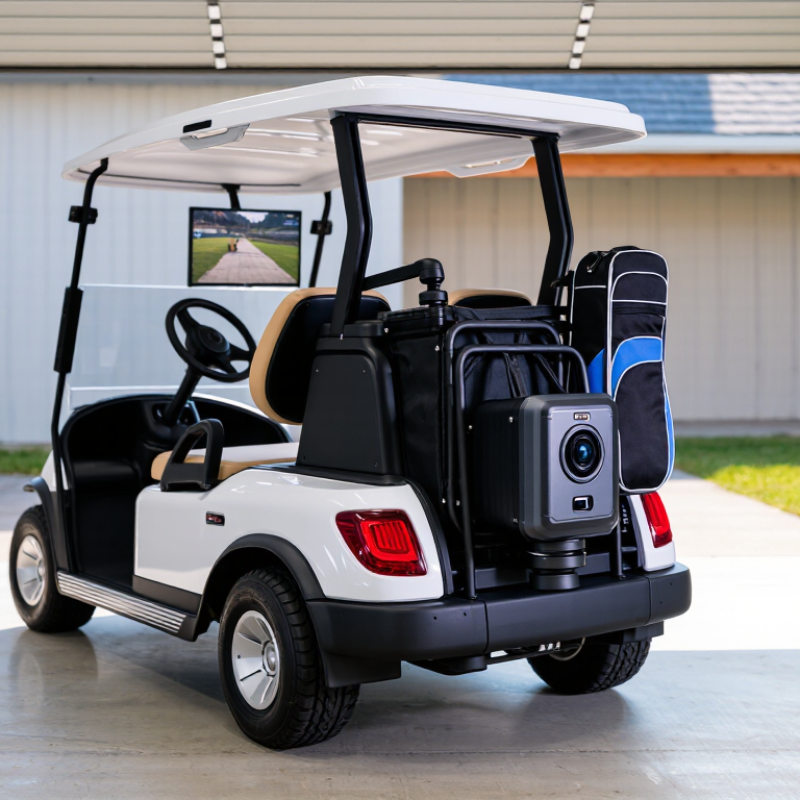
Top 10 Golf Cart Automatic Backup Cameras for Buyers

Understanding Automatic Backup Cameras for Golf Carts

An automatic backup camera usually turns on when a golf cart is shifted into reverse. A small camera near the rear can show nearby obstacles on a screen mounted by the driver. This is useful when backing out of a shaded garage or navigating a crowded path. The image offers another view, not a complete picture.

Check the camera’s viewing angle before choosing a system. A wide view can reveal a low curb or golf bag, but objects may look farther away than they are. Screen size and brightness matter in direct sun. At dusk, glare, dust, or a wet lens can make details harder to see. Keep the lens clean.

Compatibility deserves attention. Golf carts may use different electrical systems, and the camera and display must receive suitable power. Automatic activation also depends on a reliable connection to the reverse signal. A careful installer should confirm the wiring and protect exposed connections from moisture. It sounds straightforward, but installation can be fiddly.

Use the screen alongside mirrors and a direct look behind the cart. A camera may miss something close to the bumper or outside its viewing angle. Pause on a level surface and check the surroundings before reversing. That extra habit can feel unnecessary, until visibility is poor.

How Golf Cart Backup Camera Systems Work

How Golf Cart Backup Camera Systems Work

A golf cart backup camera uses a small rear-mounted camera to show obstacles on a screen near the driver. The camera receives power from the cart’s electrical system, often through a fused connection. Some systems send video through a cable; others transmit it wirelessly. The display may turn on with the cart or activate when reverse is selected. Not every cart has a compatible reverse signal, so check the wiring before installation.

When the camera activates, its lens captures the area behind the cart and sends the image to the display. A wide viewing angle can reveal a nearby post or curb, but it may make distant objects look smaller. Sun glare, dust, and rain can also reduce visibility. I’ve found that a camera helps with low obstacles, though it cannot replace looking around. The screen can take a moment to become familiar.

Tips: Mount the camera high enough to avoid bumps, but angle it down to show the ground behind the cart. Keep the lens clean. Test the view with a person standing safely behind the parked cart, then adjust the angle if the image hides the rear tires.

Key Features to Compare Before Buying

Compare the camera’s viewing angle, image clarity, and low-light performance before focusing on resolution alone. A very wide view may reveal more of the path, but objects can appear smaller near the edges. Check whether the image stays clear when the cart reverses at dusk or beneath tree cover. Small details matter. A bright display with adjustable contrast can be easier to read in direct sun. Screen size is not everything; glare can still hide a curb or low post.

Power and installation deserve equal attention. Confirm that the camera and monitor suit your cart’s electrical setup, and check cable length before choosing a mounting position. Wireless models avoid a long cable, but nearby equipment or the cart’s body may affect signal stability.

Ask about weather resistance and look for clear specifications, rather than relying on vague claims like “all-weather.” Also compare delay: even a brief lag can make reversing feel awkward. A feature list cannot tell you how a camera performs on your particular cart. I would leave room for that uncertainty, and check the return terms before buying. A tidy installation is useful, but a secure camera angle matters more.

Top 10 Golf Cart Automatic Backup Cameras for Buyers

Top 10 Golf Cart Automatic Backup Cameras for Buyers

Choosing an automatic backup camera for a golf cart starts with how you use the vehicle. On a busy course or around a crowded garage, a rear view can help reveal pedestrians, posts, and low obstacles. Look for a camera that activates when reverse is selected, so you do not need to switch it on manually. Check that its power requirements match your cart. Compatibility matters.

Compare the screen size, viewing angle, and image clarity in daylight and shade. A wide view can show more of the path, but objects may appear smaller or farther away. That takes practice. Weather resistance is also worth checking, especially if the cart stays outdoors. Review how the camera and display mount, and whether cables can be routed safely without snagging or interfering with moving parts.

Before choosing from any top-ten list, read the installation details and confirm what comes in the kit. Some setups may need extra wiring or a suitable power connection. If possible, test the image while the cart is stationary, then check the view with a person standing behind it. Do not rely on the camera alone; mirrors and a direct visual check still matter. Even a useful system can leave blind spots, and installation instructions are not always as clear as they should be.

Golf Cart Automatic Backup Cameras: Common Display Sizes

Compare commonly offered monitor diagonals when choosing a backup camera kit. Larger screens can make the rear view easier to see, but also need more dashboard space.

Screen sizes shown are common examples; availability varies by kit.

Choosing a Camera for Your Cart and Driving Needs

Choosing an automatic backup camera starts with how your golf cart is used. A cart carrying passengers needs a clear view behind the rear seat, while a utility cart may need visibility around a loaded cargo rack. Walk behind the parked cart and note what blocks your sightline. The roof supports, golf bags, or a raised rear seat can hide low obstacles.

Check the camera’s viewing angle and the display before choosing a system. A wide view can help reveal nearby objects, but distant details may appear smaller. Mount the screen where you can glance at it without turning far from the driving path. Test visibility in bright afternoon sun, not just indoors. Glare matters. If you often reverse at dusk, check how clearly the camera shows curbs and dark objects in low light. Rain drops and cart vibration can also affect the image, so weather resistance and a secure mount are practical priorities.

Confirm that the camera’s power and installation requirements suit your cart. Some carts have different electrical setups, so verify compatibility in the manual or with a qualified installer. Parking guidelines can help with alignment, but they are not a measure of exact distance. I would still turn and check the area directly. A camera can reduce blind spots, though it cannot remove them completely.

Top 10 Golf Cart Automatic Backup Cameras for Buyers - Choosing a Camera for Your Cart and Driving Needs
Rank Camera Setup Best For Automatic Reverse Activation Connection Type Display Recommendation Buyer Checks
1 Wired camera with reverse-triggered display Buyers who prioritize a consistent video connection Connects to a reverse signal so the image appears when reverse is selected Video cable plus a separate trigger wire Compact 4.3–5-inch monitor Confirm cable routing, connector compatibility, and a suitable low-voltage power source.
2 Wireless camera with reverse-triggered display Carts where running a long video cable is inconvenient Reverse signal powers or activates the camera; the display receives the video wirelessly Wireless video link; power wiring is still required 5–7-inch monitor Check the stated transmission range and test for interference with the cart body and nearby equipment.
3 Wide-angle rear camera Drivers who need a broader view behind the cart Reverse-triggered Wired or wireless, depending on the selected system 5–7-inch monitor Compare the camera’s stated horizontal viewing angle; a wider view can show more area but make objects appear smaller.
4 Low-light camera with automatic image adjustment Use in shaded areas or during early morning and evening Reverse-triggered Wired or wireless 5-inch monitor with adjustable brightness Review the camera’s low-light specifications and avoid assuming that infrared lighting is included.
5 Weather-resistant rear camera Outdoor carts exposed to rain, dust, or splashes Reverse-triggered Wired or wireless 5–7-inch monitor Check the published water- and dust-resistance rating for the camera and protect exposed connectors.
6 Camera with adjustable mounting bracket Carts with a roof, rear panel, or mounting position that varies by model Reverse-triggered Wired or wireless 4.3–5-inch monitor Confirm that the bracket fits the mounting surface and can be aimed without blocking the lens.
7 Mirror-style monitor and rear camera Drivers who prefer a display positioned near the normal line of sight Reverse-triggered image; some displays may also function as a mirror when inactive Usually wired; confirm the kit’s connection design Mirror-style display sized to fit the cart’s mounting area Check mounting compatibility, screen visibility, and whether the display retains a reflective mirror surface.
8 Split-screen system with rear camera input Buyers planning to add another camera, such as a cargo-area view Reverse-triggered rear view; other views depend on the system Typically wired multi-camera inputs 7-inch monitor or another size supported by the system Verify the number of supported camera inputs and how the display switches between views.
9 Compact camera with a small monitor Small carts where dashboard space is limited Reverse-triggered Wired or wireless 4.3-inch monitor Measure the available mounting space and confirm that the screen remains readable from the driving position.
10 Camera and monitor kit with a dedicated power converter Carts whose electrical system does not provide compatible camera power Reverse-triggered when wired to a compatible reverse signal Wired or wireless video; converter handles the specified input voltage 5–7-inch monitor Match the converter’s input and output ratings to the cart and camera. Do not connect a 12-volt camera directly to a 36- or 48-volt battery pack.
Selection note: These entries describe camera setup types rather than specific products. Features and specifications vary by model. Before buying, verify the cart’s voltage, reverse-signal wiring, display and camera compatibility, mounting options, and weather-resistance ratings.

FAQS

How does a golf cart backup camera work?

A rear-mounted camera captures the area behind the cart and sends video to a nearby screen. Some systems use cables; others transmit wirelessly. Simple enough.

When does the display turn on?

It may activate when reverse is selected or when the cart starts. Automatic activation avoids manual switching, but check whether your cart has a compatible reverse signal.

What obstacles can a camera help reveal?

It can show low objects, such as a curb, post, or person behind a parked cart. Blind spots remain.

How should the camera be mounted?

Mount it high enough to avoid bumps, then angle it down toward the ground and rear tires. Test the view with someone standing safely behind the stationary cart. Small adjustments can matter.

What can affect image quality?

Sun glare, dust, and rain can reduce visibility. Clean the lens regularly. Easy to forget.

Is a wider viewing angle always better?

A wide angle shows more nearby path, but distant objects may look smaller or farther away. It takes practice.

What should buyers check before installation?

Match the power requirements and reverse wiring. Check weather resistance, mounting options, kit contents, and cable routes. Wires should not snag or interfere with moving parts.

Can a camera replace mirrors or looking behind?

No. Use the screen with mirrors and a direct visual check. Relying on the camera alone feels tempting, but that deserves a second thought.

Conclusion

A Golf Cart Automatic Backup Camera can make reversing safer and easier by showing the area behind the cart when the driver shifts into reverse. These systems typically combine a rear-facing camera with a display and an automatic activation feature, so the view appears without requiring the driver to switch it on manually. Understanding how the camera, screen, and power connection work together can help buyers choose a setup that fits their cart.

Before buying, compare image clarity, viewing angle, screen size, night visibility, weather resistance, installation requirements, and power compatibility. The best choice depends on how and where the cart is driven: a cart used in tight spaces may benefit from a wider view, while frequent use in low light calls for a camera that provides a clear image after dark. Considering these needs, along with ease of use and reliable operation, can help buyers select a practical system from the available options.

Amelia

Amelia

Amelia is a dedicated marketing professional with a deep understanding of the company’s products, customers, and industry landscape. Through years of experience in market research, content strategy, and customer communication, she transforms complex product information into clear, practical, and......